
Showing posts with label facebook tricks. Show all posts
Sunday, 28 December 2014
how to crate Confession pages on facebook
Writing a post after long time due to exams, Recently on Facebook i saw lots of Confession pages being created, Confession pages are becoming a viral on facebook.
]

Many ask How this pages are created, as you would have seen it on facebook, its not a page similar to other pages,confession page where people can confess things in front of everyone or may dedicate to someone without revealing their identity.
Lets check how it is created.
Step 1 : Login to your facebook account.
Step 2 : Click on create a page which you will find it very easily.
Step 3 : Now select Cause or Community and then write the name of the page Eg : Abc confession. Dont forget to check the box I agree to facebook page terms.
Step 4 : Click on get Started and now you have created a page
Step 5: Next you have to update your page cover pic and page profile pic of Your Desire that suits your Confession page. Invite your friends, family members to like the page. Every thing is done with the Facebook page now you need to link it with the Anonymous form
CREATE AND LINK A FORM USING GOOGLE DOCS.
Step 1: Goto https://docs.google.com and sign into your Google account (Sign up if you dont have an account)
Step 2 : Click on Create and Select the Form option from there.
Step 3 : Now choose the Theme and fill the Complete Form.
Step 4 : Next you have to click on Add items and select Paraghraph Text
Step 5 : Customize the blank Fields and save it.
Step 6 : Next you have to click on View live Form and copy the url.
Step 7 : Now click on Choose response Destination and Select new Spreadsheet, Name it and then save it.
Step 8 : Now paste the Url on the facebook and ask People to Click on the link and confess.
Whenever someone will fill the form you will get a message, All you have to do is just copy the confession from the spreadsheet and paste it on your facebook page with the confession number.
So this is how it works,
Thank you.
Thank you.
How to publish empty status and Comments on fackbook
Hello Everyone Today We Will Discuss On Publishing Empty Status/Comments on Facebook.
You Must Have seen your Friends Who Knows This Trick Publishing Empty Status And Comments On Facebook, But When Ask Them How they Do it? They Won’t Answer You.
Now its Time to Show Your Friends That Even you Know the Trick To Publish Empty Comments and Statuses.
Step 1: Login To Your Facebook Account.
Step 2: Copy This Code > @[0:0: ] and Paste it in Status Box and Click on Post.
Step 2: Copy This Code > @[0:0: ] and Paste it in Status Box and Click on Post.
OR
Click On Status Box, Press and Hold ” Alt ” and Press 0173. Leave Alt key and click on Post. See the magic.

This is very much easy and similar to Posting Empty Status.
Step 1: Login to Your Facebook Account.
Step 2: Goto Any Post Where Your Want to Publish Your Empty Status.
Step 3: Click on Add a Comment, now Press And Hold “Alt ” Key and Press 0173 and press enter.

Thats it, Its As Simple as that.
Update: Recently On Facebook I Noticed That if You Comment “0” In any posts, then it shows Blank That means You have posted Blank Comment.
Saturday, 27 December 2014
How to get email ids of your all Fackbook Friends
How to get email ids of your all Fackbook Friends
If you want to know email id of your facebook friends which is hidden and not showing in your friends facebook profile so here is the trick through which you can get email addresses of your all facebook friends .
Just Follow Below Given Simple Steps :
Step 1 – If your facebook account is not connected with Yahoo id then first Create an email id in yahoo and connect your facebook account with yahoo Email Id .
Step 2 -Now Login to Yahoo Mail and then go to the Contacts Tab.
Step 3 – Click on Import Contatcs.
Step 4 – Now Click on Facebook .
fb trick 2012 How to Get Email ids of your all Facebook Friends Facebook Trick 2012
Step 5 – In Pop Up You will get Message that Do you want to Share your Contacts with Yahoo ! Click on OK .
facebook tricks 2012 How to Get Email ids of your all Facebook Friends Facebook Trick 2012
Step 6 – Now you will get Message
Step 7 – Thats it ! Click on View imported contacts and See you facebook friends Email Ids .
- Thank you
Remove your last name from you facebook profile
Hey Guys, i have came accross a very cool trick,Using which you can remove your last name from you facebook profile. Sounds interesting,
Many will find this trick cool. ofcourse you will.
You must be knowing that Facebook dont allow to make Profile with just first name,
but here is the latest trick through which you can hide your last name easily and make your profile with just first name.

but here is the latest trick through which you can hide your last name easily and make your profile with just first name.
Just follow the below steps
Follow The Steps :
1) First you need Indonesian Proxy Servers.
This proxy will help you to hide your last name.
This proxy will help you to hide your last name.
2) Goto Firefox — Options — Advanced — Network — Settings — Connection Settings — And choose manual proxy configuration.
3) Now the real Trick starts “Use This Proxy Servers For All Protocols”.
4) Put this proxy and port Http Proxy : 202.70.136.142
Port : 8080 5) Put 202.70.136.142 on No Proxy for Box.
6) Now goto your profile and remove last name then save it.
7) Bravo!! You Just Did It, Now Your Last Name Is Gone, and What left is just you 1st name.
I personally tried this trick, and you will try it as well for sure.
Thank you
Friday, 19 December 2014
HOW TO DRAG FACEBOOK CHATBOX ANYWHERE
FACEBOOK TRICKS, HOW TO DRAG FACEBOOK CHATBOX ANYWHERE, TRICK TO DRAG YOUR FACEBOOK CHATBOX ANYWHERE
Guys We Know Facebook Chatbox has its Fixed Position . But Today We Will Learn To Drag Your Facebook Chatbox anywhere On The Screen,
This is an Awesome Facebook Trick which you willl Like to Perform and Show Your Friends.
This is an Awesome Facebook Trick which you willl Like to Perform and Show Your Friends.
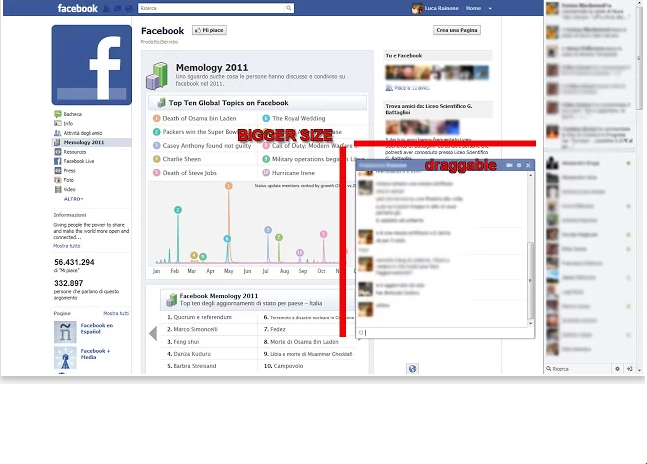
We will Use Just 1 Google Chrome Extention Which Will not only enable you to Drag you Chatbox Everwhere but you will also Experience Increase in the Size of your chatbox.
Step 1: First of all Click here To Add Pretty Facebook Chat Extention To your Chrome Browser
Step 2: Click on Add to Chrome then you will be asked to Confirm New Extetion, So click on Add Button.
Step 2: Click on Add to Chrome then you will be asked to Confirm New Extetion, So click on Add Button.
Step 3:The Extention will Start Downloading, Once Downloaded , Just Open Your Facebook and See Your Chatbox. Now You can drag it anywhere on the screen and also the Size of the Chatbox will increase.
Note: If you Want To Revert Changes then just Goto Setting > Tools > Extentions and Disable the Extention. Or You Can Delete it if you think You Will not Use it again.
Tuesday, 16 December 2014
How to download videos from Facebook
How to download videos from Facebook

Facebook is one word that no one is unfamiliar with. Everybody is connected to everyone else via Facebook. It enables people to message each other, upload and download pictures, audio and videos. And when someone uploads it, it is very obvious that someone will be able to download it too. People are so much into social networking that everything that they like is up there on this site and hence everyone can see it. The pictures are something that can be easily downloaded and uploaded but people tend to get confused when it comes to videos.
They don’t really understand what exactly to do when they have to download a video from Facebook. The uploading of video takes a lot of time when one is trying to do it from the laptop or from the PC itself. Since this takes so much of time the downloading would too involve some or the other process. Usually there are smart phones which have an option of downloading any content which is up there on Facebook and there are few too which don’t allow the same. Then what do we have to do then? Well there are a few steps which can be followed if we want to download videos that have earlier been uploaded on Facebook. The only thing that people are scared of is the person who has uploaded the video might just take it down before you even get to enjoy it properly. What can one do in that case? Here is what you have to do:
- Since Facebook is a place where the videos from different sites can be hosted, one can view and save the videos directly from those sites. If one does not find any host site one can be sure that the video might have been hosted by Facebook itself.
- The various videos have the own link addresses and the host addresses. You can see the video that you want to download and then right click on it to see an option that reads ‘copy link address’ you can then copy the address. If not you can see the address on the bar on the top of the page, and copy that too when the video has already been loaded. Eg- “http://facebook.com/photo.php?v=xxxxxxxxxxxxx” or http://facebook.com/video/video.php?v=xxxxxxxxxxxxx
- There are a lot of video downloading applications and software that are available especially for Facebook videos. One can log on to those sites and see if they can get hold of the videos or not. But here only the button next to the download link the real one as the rest of them are fake links, and this is one way you can download Facebook videos.
- When one has used different browsers for viewing these videos, there are different ways in which the video can be downloaded. There are options called the ‘Developer Tools’ followed by the ‘Undock’ button. The following list will show you a list of videos that are currently being played and by seeing the name you will know how to save the video.
Hence the video can be downloaded from Facebook.
Best Facebook Tips/Tricks Updated 2014
Best Facebook Tips/Tricks Updated 2014

- Messaging someone that has blocked you on Facebook
- Using faces of your friends as smileys or emoticons
- Removing the inbox “seen” option for messages
NTechTricks has come out with some of the latest tricks for Facebook that many people don’t know about, but here, they will be revealed. One of the most recent trick options to take advantage of is the change of the Newsfeed layout. As you read along you can dig deeper to learn more about some of the latest tricks of Facebook.
Posting a Blank Status
Posting a blank status on your Facebook page is something that you can do whether you knew it or not. Take a look at the code below. The code is what you will use to do this:
@[0:0:]
Copy and paste the above code into the status bar where you would normally type a status. Press Enter and there you have a blank status on your Facebook wall.
Finding Friends who have Unfriended You
It takes some people a while to figure out who has unfriended them on Facebook. One day you might just try to check on someone’s page and see that you are not friends with them anymore. Well, there is now a way that you can figure this out without having to search your friend’s list. With this trick, you will also be notified when someone unfriends you. Below are the steps that you need to carefully follow to find this trick useful.
- Login to Who.Deleted.me from the internet browser that you use.
- You will be able to login to your Facebook account from this page.
- You will need to grant permission for this application to have access to your Timeline information.
- Once the permission has been granted you will be able to use this method.
- Full details of those who have unfriended you will be given, as well as when; dates, months, etc.
Removing the Seen Option
Facebook has this annoying feature that many people can not stand. This is the ‘seen’ feature which shows others if you have seen a message that they have sent to your inbox or posts in a group. Sometimes we may not want people to know that we seen their message, especially if we don’t plan on responding back to them. The good news is that now you can get rid of this once and for all. You can do this with an Add on.
- The downside is that only Google Chrome users can take advantage of this Add on.
- First, you need to download the Add on
- Restart your browser after you have downloaded the Add on.
- Next, login to your Facebook account and turn on the Add on feature from the right hand side of your browser.
- Now the Facebook seen option will be removed when you view messages and posts.
I have also written a detailed article about How To Disable Seen Feature in Facebook. Click Here For the full article.
facebook tricks, Get New Facebook News feed Immediately
facebook tricks, Get New Facebook News feed Immediately

To get the New News Feed You have to Join The Waiting list . But It takes Few Days or Months To get it.
Many Guys like Me Dont Like to wait, So Today I m Going to Share Third Party Extension By Google Chrome Browser Which Will Change Your Facebook News Feed Immediately and You Dont need to Wait
Many Guys like Me Dont Like to wait, So Today I m Going to Share Third Party Extension By Google Chrome Browser Which Will Change Your Facebook News Feed Immediately and You Dont need to Wait
How to Get New news Feed:
Step 1 : Login To Your Facebook Account.
Step 3: Add The Extension To Your Chrome Browser By clicking on Add to Chrome And then ADD.
Step 4: Check your Facebook and boom, Whole new Facebook news Feed in Your account, And remember You Got it Far Earlier then Your Friends.
Enjoy.
Keep Visiting.
Subscribe to:
Posts
(
Atom
)